Memory Journal
Capture moments tied to your experiences and journeys.
Updated October 3, 2026
Memory Journal lets you capture moments tied to your experiences and journeys. It's a private collection of notes, images, and emotional context that lives next to your wallet and bookings. The page is at /memory and is reachable from the Memory Journal entry in the sidebar.
When to use it
A memory is loosely structured. Common reasons people use it:
- After completing a curated experience or custom journey, log what stood out
- Pin photos and short reflections to a specific date so they're easy to find later
- Tag entries with an emotion and intensity (1 to 5) so you can browse by mood
The journal is private to your account. No one else (concierge, admin, corporate) sees what you write here.
The Memory Journal page
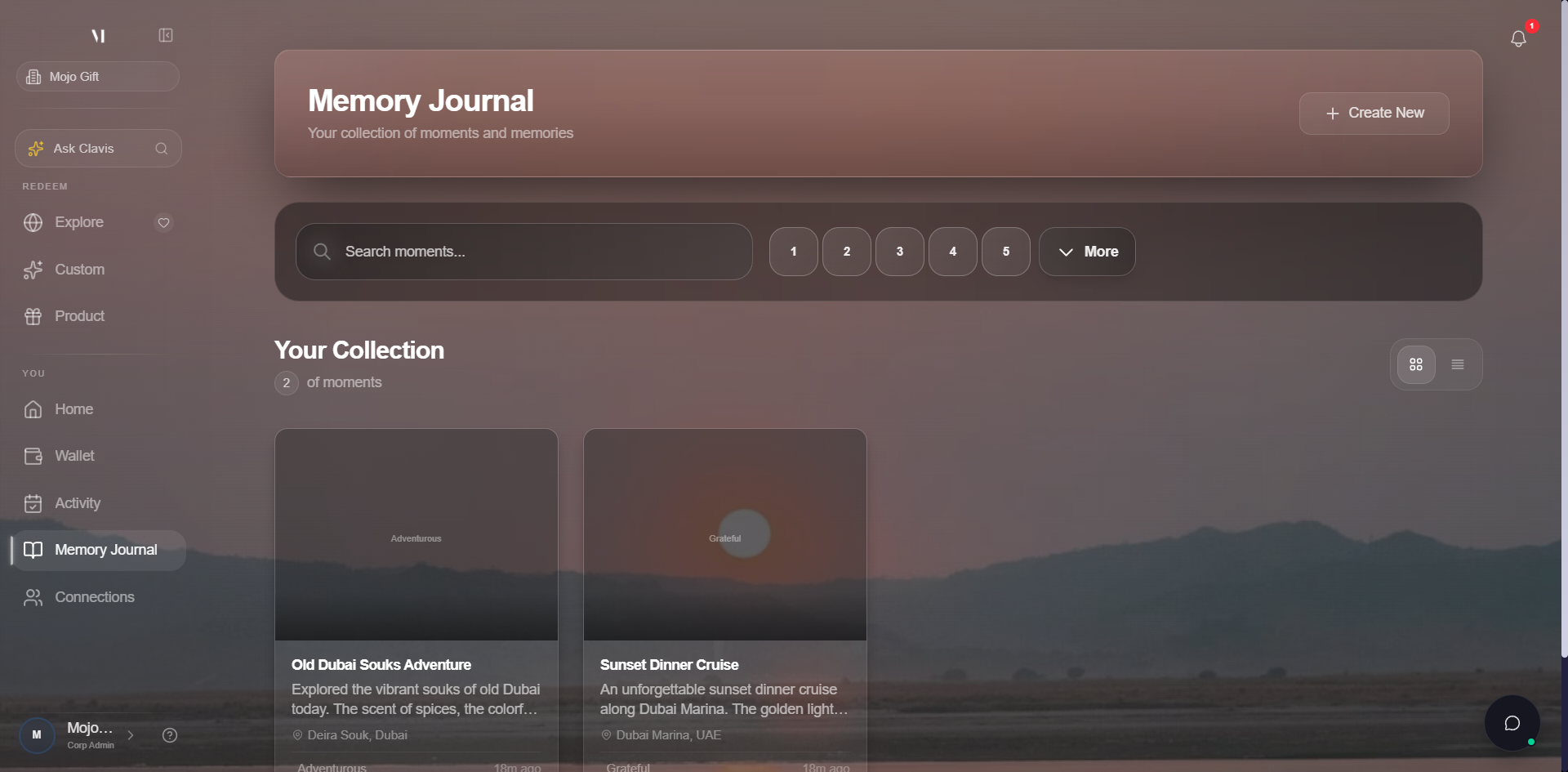
The page has these controls:
| Control | What it does |
|---|---|
| Create New / Create First Memory | Opens the create modal. Same modal both buttons. |
| Search memories | Filters the list by keyword in the title or reflection text. |
| Intensity filter (1 to 5) | Filters the list by how strong the emotion was when you logged the entry. |
| More | Opens additional filters (emotion category, date range). |
Creating a memory
Click Create New to open the create modal. A memory captures:
| Field | Required | Notes |
|---|---|---|
| Title | Yes | A short label that appears in the list. |
| Reflection | Yes | Free-form text. The body of the memory. |
| Date | Yes | Defaults to today. Pick any date, including the past. |
| Emotion | Optional | Picked from a curated list (joy, awe, peace, etc.). |
| Intensity | Optional | 1 to 5 scale, only meaningful if you set an emotion. |
| Media | Optional | Up to 8 photos or videos, max 5 MB each. |
After saving, the memory appears at the top of the list and is searchable immediately.
Viewing and editing
Click any memory in the list to open the detail page. The detail page shows the reflection in full, the date, the emotion and intensity, and any attached media in a gallery. From the detail page you can:
- Edit the title or reflection
- Add or remove media
- Change the date or emotion
- Delete the memory (this is permanent)
Public sharing
Some memories can be shared publicly via a tokenised URL. Look for the Share action on the detail page. Sharing creates a read-only public view at /memory/<id>/public; revoking the share removes that URL immediately.
What's next
- Tracking bookings is where completed experiences appear; cross-reference dates when logging a memory.
- Getting help covers what to do if a memory looks corrupted or media won't upload.